
Table of Contents
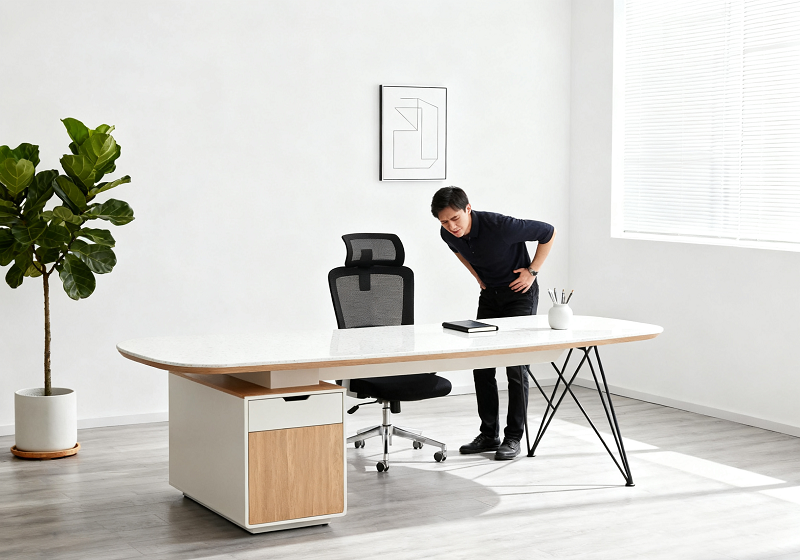
Prolonged sitting puts up to 40% more pressure on the lumbar spine than standing. Without proper back support, that load accumulates into muscle tension, disc problems, and chronic pain. This guide covers the features that actually help, matched to specific back conditions and body types.
How Sitting Affects Your Spine?
The spine relies on proper support to stay aligned. When you sit, the lumbar region absorbs the most pressure. A well-designed ergonomic chair protects the spine; a poorly designed one gradually damages it.
The Science of Lumbar Support
Lumbar support is non-negotiable for back pain relief. The lumbar spine (L1-L5) curves inward naturally. Sitting without support flattens that curve, which strains the discs and surrounding muscles.
Effective lumbar support needs to meet three criteria:
- Alignment: It should target the small of your back, roughly 1 to 2 inches above the belt line.
- Adjustability: It should move up and down to accommodate different torso lengths, and forward and backward to control the depth of pressure.
- Flexibility: It should adapt to minor movements, like leaning forward to type, without losing contact with your back.
Research from the American Chiropractic Association shows that chairs with adjustable lumbar support reduce lower back pain by up to 35% compared to standard chairs. Orthopedic specialists consistently identify adjustable lumbar depth, not just height, as the single most important feature in a chair designed for back pain. A fixed lumbar position may suit one body perfectly and actively worsen pain in another.

How Poor Posture Strains the Spine
A bad chair creates a chain reaction of spinal stress. The most common patterns:
- Slouching: Flattens the lumbar curve, shifts weight to the mid-back, and leads to shoulder hunching and forward head posture.
- Dangling Feet: A seat that's too high forces feet off the floor, which increases lumbar pressure and cuts circulation to the legs, worsening fatigue and swelling over the course of a day.
- Overly Deep Seats: A long seat pan pushes the lower back away from the backrest, forcing the body to lean forward, straining lumbar discs and tightening the hip flexors.
A 2023 study published in the Journal of Occupational and Environmental Medicine found that office workers in non-ergonomic chairs are 2.8 times more likely to develop chronic lower back pain.
How Chair Design Affects Spinal Alignment
Chair design affects spinal alignment in ways most people don't think about until something hurts. Three features drive most of the difference between a chair that helps and one that doesn't:
The backrest curve is where it starts. A contoured backrest mirrors the natural S-shape of the spine and keeps vertebrae stacked properly. A flat backrest does the opposite, forcing the spine to adapt to the chair's shape rather than supporting its own.
Seat tilt changes where pressure lands. A 5-degree forward tilt encourages active upright posture during work. A 2 to 3-degree backward tilt reduces lumbar pressure during breaks. A fixed 90-degree seat concentrates load directly on the lower back with no relief.
Armrest height has a bigger effect on the upper spine than most people realize. Armrests aligned with your desk, elbows at 90 degrees, prevent the shoulder hunching that leads to mid-back and neck tension. Too high and the shoulders creep up; too low and the upper body leans to compensate.
|
Design Feature |
Standard Chair |
Ergonomic Chair |
Impact on Spinal Alignment |
|
Backrest Curve |
Flat or slightly curved |
Contoured to S-spine |
Ergonomic maintains natural curve; standard flattens lumbar |
|
Lumbar Support |
None or fixed |
Adjustable (height and depth) |
Ergonomic reduces pressure; standard increases strain |
|
Seat Tilt |
Fixed at 90° |
Adjustable (5° forward / 3° backward) |
Ergonomic distributes weight; standard concentrates pressure |
|
Armrest Adjustability |
Fixed height and width |
3D or 4D adjustable |
Ergonomic reduces shoulder strain; standard causes hunching |
What to Look for in an Ergonomic Chair
Choosing an ergonomic chair isn't about price. It's about fit. The best chairs for back pain balance adjustability, material quality, and targeted back support across a full workday.
Five Key Adjustability Features
For anyone dealing with back pain, the difference between a chair that provides genuine back support and one that merely looks ergonomic often comes down to these five features:
- Adjustable Lumbar Support: Should move both up and down and forward and backward, not just up and down.
- Seat Height: A range of 16 to 21 inches accommodates most users with feet flat on the floor and knees at 90 degrees.
- Backrest Recline: 100 to 110 degrees is the optimal working range for reducing lumbar disc pressure, with tension control that matches your body weight.
- Seat Depth: 17 to 20 inches, with 2 to 3 inches of clearance between the edge of the seat and the back of the knees.
- Armrest Adjustability: 3D at minimum (height, width, pivot) or 4D (adds depth) to prevent shoulder strain during long sessions.
A chair missing any of these, even if it carries an ergonomic label, isn't a reliable option for back pain.
Seat Materials and Back Support
Chair materials affect both comfort and the consistency of support over time. Choose based on how long you sit each day.
- Mesh: Breathable and lightweight, it conforms to the body without trapping heat. High-density 3D knitted mesh resists sagging over years of use, making it the best choice for sessions of 8 hours or more. Avoid low-density mesh, which typically loses its shape within 6 to 12 months.
- Foam: Memory foam molds to the body and relieves pressure points. High-resilience (HR) foam is firmer and more durable, which makes it better for consistent lumbar support over time. Look for medium-density foam in the 1.8 to 2.2 lb/ft³ range for the best balance of comfort and structure.
- Leather: Easy to clean and visually premium, but it retains heat and faux leather peels with extended use. Better suited for sessions of 2 to 4 hours.
For back pain, mesh or HR foam is the practical choice. Both maintain consistent support and temperature throughout a full workday.

Lumbar Support Technologies Compared
Two support approaches dominate the ergonomic chair market, and they work differently.
A 3D dynamic dual-back system uses two independent backrest panels, one for the lumbar region and one for the mid-back. They move separately in three directions: up and down, forward and backward, and side to side. When you lean forward to type, the lower panel follows. When you recline, both panels tilt together. When you reach sideways, the side panels engage to maintain contact. This system is built for people who move frequently throughout the day and need full-back coverage.
Active lumbar adjustment uses a single adjustable lumbar pad that responds to your posture, either manually through a lever or knob, or automatically through sensors that detect posture shifts in real time. It's more targeted than a dual-back system, focusing on the lumbar region specifically, and works best for people who hold relatively fixed positions during focused work. The key advantage is continuity: the lumbar pad maintains contact through subtle position changes instead of requiring manual re-adjustment mid-session.
|
Feature |
3D Dynamic Dual-Back |
Active Lumbar Adjustment |
|
Coverage |
Full back (lumbar and mid-back) |
Lumbar region only |
|
Movement Adaptation |
Automatic, follows all movements |
Manual or sensor-based |
|
Best For |
Frequent movement throughout the day |
Sustained, focused work |
|
Price Range |
$500 to $1,500 |
$300 to $1,000 |
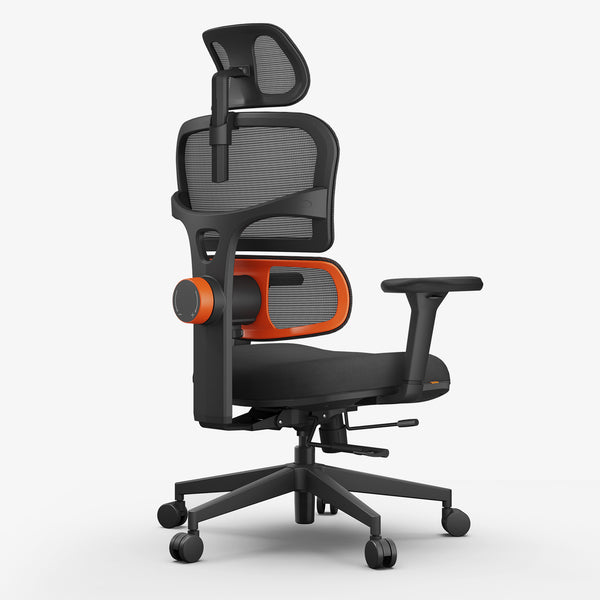
The Newtral NT001 (from $349) and NT002 (from $499) are both built around patented auto-following lumbar technology that continuously tracks your lower back whether you're leaning forward, sitting upright, or reclining. The NT002 adds a retractable footrest and an aluminum alloy base, while the NT001 is the more accessible entry point with the same core lumbar system. See ergonomic chairs for back pain for a side-by-side comparison of both models.
blog18

What Orthopedic Specialists and Chiropractors Recommend
The features outlined above aren't marketing checkboxes. They reflect the biomechanical requirements of a spine under load for hours at a time, and they align with what orthopedic specialists and chiropractors consistently recommend in clinical practice.
A chair that meets clinical standards supports the lumbar curve without locking the spine into a fixed position, allows for natural micro-movements while seated, and doesn't create secondary tension in the shoulders or hips. The key distinction practitioners make is between a chair that accommodates a body and one that actually fits it, which is why adjustability range matters more than any single preset feature.
Newtral chairs have been independently assessed by credentialed ergonomists and healthcare professionals, including specialists in workplace injury prevention. Their findings, certifications, and full endorsement details are available on the Newtral certifications page.
Best Chair for Your Specific Needs
Not all back pain is the same, and not all ergonomic chairs solve it the same way. This section matches the right chair features to specific conditions, sitting durations, and body types.
Best Chair for Lower Back Pain
Lower back pain centered in the lumbar region, typically dull and persistent, is the most common complaint among desk workers. It's also the most directly influenced by chair design. When the lumbar curve loses support, surrounding muscles have to compensate, which is what causes that familiar ache that builds over the course of a workday.
The priority features for this condition are depth-adjustable lumbar support, a recline range of 100 to 110 degrees for active work, and a seat with forward tilt capability. Together, these three reduce the compressive load on L1-L5 and keep the lumbar curve supported through natural position changes.
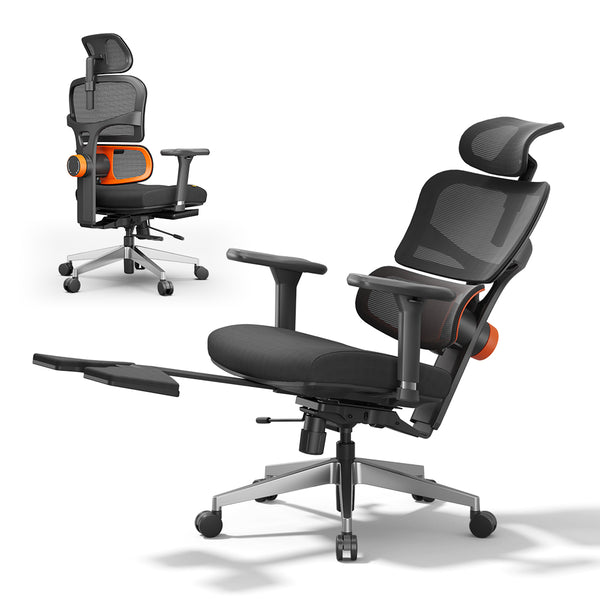
The Newtral NT002 for lower back pain addresses all three. Its auto-following lumbar system continuously tracks the lumbar spine, maintaining consistent support whether you're leaning forward to review a document or reclining during a call. Based on brand user testing, it reduces lumbar pressure by up to 38% during extended sessions compared to sitting without active lumbar support.
blog18
Best Chair for Herniated or Bulging Disc
A herniated disc, most commonly at L4-L5 or L5-S1, creates a specific seating challenge that standard lumbar support often can't solve. The curvature depth of the lumbar spine varies significantly between people, and a lumbar pad set at the wrong depth can increase disc pressure rather than relieve it.
For herniated disc and bulging disc conditions, these features matter most:
- Depth-adjustable lumbar: Not just height. The ability to control how far the support pushes into the lumbar curve is critical. A pad that sits too shallow makes no contact; one that pushes too deep increases intradiscal pressure.
- Recline angle: A tilt of 100 to 110 degrees reduces pressure on lumbar discs compared to sitting upright at 90 degrees. Locking the recline at this angle during active work can make a meaningful difference accumulated over a full day.
- Dynamic support: A lumbar system that follows your posture as you move is especially important for disc conditions. Every time a fixed pad loses contact with your spine, the disc absorbs the full load without any assistance, and those unsupported moments add up over an eight-hour day.
Avoid chairs with fixed lumbar pads or aggressive forward tilt mechanisms if you're managing a herniated or bulging disc, as both can increase pressure on the affected segment.
Best Chair for Mid Back Pain
Mid back pain in the thoracic spine, from T1 to T12, has a different origin than lower back pain. It typically develops from sustained forward head posture, rounded shoulders, and a lack of upper back support during long sitting sessions. A chair that only addresses the lumbar region won't solve it.
For mid back pain, the features that matter most are:
1. High backrest height: The backrest should reach at least to the shoulder blades, and ideally above them, to provide meaningful upper back contact. Look for a backrest of 24 inches or taller from the seat base.
2. Upper panel support: A 3D dual-back system with an independent upper panel directly addresses the thoracic region, which standard single-panel backrests leave unsupported. The upper panel stabilizes the mid-back while the lower panel handles the lumbar independently.
3. Adjustable headrest: Reducing the forward head load is one of the most effective ways to relieve mid-back tension, since forward head posture is often what drives it. An adjustable headrest that supports the neck changes the load distribution across the entire upper back.
Best Chair for Long Sitting Hours
For sessions of 8 hours or more, how a chair feels in the first hour isn't the right measure. The real question is whether it maintains consistent back support as your posture shifts naturally throughout the day.
Thick cushioning and plush materials often feel good initially but lose their structural support faster than firmer, adaptive systems. A chair that feels great at 10 in the morning may leave you slouching by 2 in the afternoon because the cushion has compressed and the lumbar pad has lost contact with your back.
What long-hour sitting actually requires is dynamic back support: a system that adjusts to your posture continuously rather than waiting for you to manually readjust. The Newtral NT002's pressure-sensitive lumbar technology does this throughout the day. It firms up when you start to slouch and eases when you recline, keeping lumbar pressure consistently lower without requiring mid-work adjustments. The NT002 also includes a retractable footrest and a recline range up to 136°, lockable at any position, giving remote workers a practical way to shift posture across a full day rather than staying locked in one position.
For remote workers seated for 6 to 9 hours daily, this kind of adaptive support is the most meaningful difference between chairs in the same price range. Newtral's office chair for back pain, starting from $349 with the NT001, covers both full-day remote work setups and lighter-use home office configurations.
Best Chair for Your Body Type
Ergonomic chairs aren't one-size-fits-all. The adjustability range of a chair determines whether it can actually fit your body, not just accommodate a median figure.
For larger frames (typically 6'2" or taller, or 250 lbs or more), look for:
- Seat pan width of 20 to 24 inches to avoid hip pressure
- Weight capacity of 300 to 400 lbs with BIFMA certification
- Backrest height of 24 to 28 inches to support the full length of the spine
The Newtral NT002 supports users up to 300 lbs within a 5'1" to 6'3" range. Users above this weight threshold should look for chairs with explicit heavy-duty BIFMA certification and wider seat dimensions.
For smaller frames and shorter users (typically 5'4" or under), look for:
- Seat pan of 15 to 17 inches so the knees sit at 90 degrees without the edge pressing into the back of the thighs
- Lumbar adjustment that starts lower from the seat base to match a shorter torso
- Armrest spacing of 16 to 18 inches to align with narrower shoulder width
Both the NT001 and NT002 are designed for users from 5'1" upward, with adjustable seat depth and lumbar height that can be dialed down for shorter torsos. Seat height adjustment is one of the most underrated controls for getting a proper fit regardless of frame size, and it's a standard feature across the full Newtral lineup.

FAQs
What is the ideal chair height for back pain?
Feet flat on the floor with knees at 90 degrees. For most people, that falls between 16 and 21 inches of seat height. To find your personal ideal, measure from your heel to the back of your knee and add 1 to 2 inches. If your desk is too high for the correct seat height, use a footrest rather than raising the chair and letting your feet dangle, which increases lumbar pressure significantly.
Is an ergonomic chair good for a herniated disc?
Yes, but the features matter more than the label. The two things that make the biggest difference for disc conditions are depth-adjustable lumbar support, which lets you match the pad to your specific spinal curve rather than a generic setting, and a recline angle of at least 100 degrees to reduce intradiscal pressure during the workday. A chair with height-only lumbar adjustment or a fixed 90-degree seat often isn't sufficient, and in some cases can make disc pain worse.
What do chiropractors recommend for back pain?
Chiropractors generally recommend the same things the research supports: a chair that fits your specific spinal curve rather than a standard one, with enough adjustability to be dialed in rather than approximated. In practice, that means prioritizing depth-adjustable lumbar support and a meaningful recline range over surface-level comfort features like thick cushioning or premium materials. Many chiropractors also emphasize that no chair replaces movement, and recommend standing or walking briefly every 30 to 60 minutes regardless of chair quality.
Can an ergonomic chair cure chronic back pain?
No. An ergonomic chair is a supportive tool, not a medical treatment. Chronic back pain typically has underlying causes, such as herniated discs, muscle weakness, or nerve involvement, that a chair can't address on its own. What a good ergonomic chair can do is reduce spinal pressure during sitting, support recovery alongside physical therapy or medical treatment, and prevent poor posture habits from making the underlying condition worse over time. Always consult a doctor, physical therapist, or chiropractor for chronic pain management.
Are mesh chairs better than leather for back support?
For long sitting sessions, yes. Mesh stays breathable throughout the day, conforms to the shape of the body, and maintains its structural support longer than soft foam or leather padding. Leather, while easier to clean and more visually premium, retains heat and doesn't adapt to posture the same way. If you sit for more than 4 to 6 hours daily, mesh is the more practical choice for consistent back support over time. If you prefer leather, look for perforated leather paired with a separately adjustable lumbar mechanism to compensate for the reduced adaptability of the material.




Leave a comment
All comments are moderated before being published.
This site is protected by hCaptcha and the hCaptcha Privacy Policy and Terms of Service apply.