
Table of Contents
An ergonomic task chair is not simply an office chair with more levers. It is a chair designed to support focused desk work while adapting to the person sitting in it.
That distinction matters. A chair can look supportive and feel soft for the first twenty minutes, yet still leave you shifting, leaning forward, or searching for lower-back support later in the day. A well-fitted task chair does something quieter: it keeps essential controls within reach, supports more than one working posture, and makes it easier to move without losing support.
This guide explains what an ergonomic task chair is, how it differs from other office seating, which features deserve attention, and how to adjust one to your body and workstation.
Table of Contents
- What Is an Ergonomic Task Chair?
- Task Chair vs. Office Chair vs. Executive Chair
- Seven Features That Matter Most
- How to Choose the Right Chair for Your Body
- How to Adjust an Ergonomic Task Chair
- Common Buying Mistakes
- Newtral Task Chair Options
- FAQs
What Is an Ergonomic Task Chair?
An ergonomic task chair is an adjustable chair built for active, desk-based work. The word “task” describes its purpose: supporting activities such as typing, writing, designing, studying, meeting, and switching between screens throughout the day.
The word “ergonomic” describes how the chair fits the user and the work. In practice, that means it should help you:
- Keep your feet supported
- Position your knees and hips comfortably
- Support the natural curve of your lower back
- Keep your shoulders relaxed while using a keyboard or mouse
- Change posture without fighting the chair
- Move close enough to the desk without the armrests getting in the way
OSHA’s computer-workstation guidance emphasizes adjustability because it allows a chair to fit different users and support a variety of seated postures. A task chair becomes genuinely ergonomic only when its adjustment range works for your body and your desk.
Ergonomic Task Chair vs. Office Chair vs. Executive Chair
The labels overlap, but the priorities are different.
| Chair type | Main priority | Typical design | Best for |
|---|---|---|---|
| Basic office chair | General seating | Simple height adjustment, limited back support | Short sessions and occasional use |
| Ergonomic task chair | Fit, movement, and work support | Adjustable seat, backrest, lumbar support, arms, and tilt | Daily computer work, study, and shared workstations |
| Executive chair | Appearance and spacious comfort | Taller back, thicker upholstery, larger frame | Meetings, private offices, and users who prefer a substantial chair |
| Gaming chair | Recline and visual style | High back, side bolsters, head pillow, bold styling | Gaming and mixed leisure use |
A task chair is usually the most practical choice for focused computer work because it prioritizes adjustability and access to the desk. It can be compact, but “task chair” should not mean “basic.” The best models provide enough adjustment to keep the user supported during upright work, light recline, and posture changes.
Seven Features That Matter Most
1. Adjustable Seat Height
Seat height is the starting point for every other adjustment. Your feet should rest flat on the floor or on a stable footrest, while your knees remain around hip level and your thighs feel supported.
Do not choose a chair based only on its maximum height. Check the full range. A shorter user may need a lower minimum seat height, while a taller user or a higher work surface may require more lift.
2. Adjustable Seat Depth
Seat depth determines whether the chair supports your thighs without pressing into the backs of your knees. As a practical starting point, leave roughly two to three fingers of space between the seat edge and the back of the knees.
A sliding seat pan is especially useful in a shared office or household because people with different leg lengths can use the same chair more comfortably.
3. Lumbar Support That Fits Your Back
Lumbar support should meet the inward curve of the lower back rather than pushing against the pelvis or the ribs. Height adjustment helps place the support correctly, while depth or tension adjustment changes how strongly it contacts the body.
Static lumbar support works best when you remain in one position. Dynamic lumbar support can be more useful for task work because it continues supporting the lower back as you lean forward, sit upright, or recline.
4. A Backrest That Encourages Movement
Good task work is rarely motionless. You lean toward the keyboard, sit upright during a call, and recline while reading. A useful backrest should support these changes instead of locking you into one “perfect” pose.
Look for adjustable recline tension and a backrest that can be stopped or locked at practical angles. The goal is controlled movement: enough resistance to feel supported, but not so much that reclining becomes an effort.
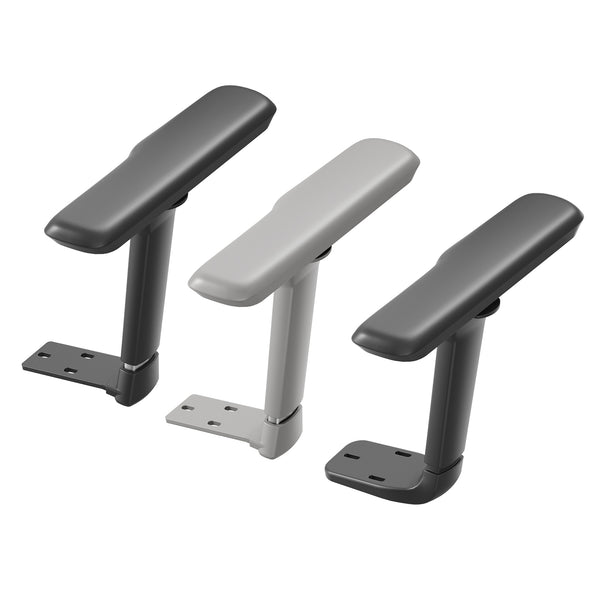
5. Armrests That Support Without Interfering
Armrests should let your shoulders relax and your elbows remain close to your sides. Height adjustment is the minimum. Width, depth, and pivot controls can make a major difference when switching between typing, using a mouse, writing, or holding a phone.
Armrests that are too high can lift the shoulders. Armrests that are too wide can pull the elbows away from the body. If they prevent the chair from moving close to the desk, lower them, slide them back, or move them aside when the design allows.
Blog18
6. A Supportive Seat With a Waterfall Edge
The seat should distribute pressure without feeling unstable. High-density foam offers a cushioned feel, while mesh emphasizes airflow and responsive support. Neither material is automatically better; the right choice depends on your preference, climate, and sitting habits.
A gently rounded waterfall edge can reduce concentrated pressure behind the thighs. The seat should also be wide enough for comfortable movement without being so large that the armrests sit too far away.
7. A Stable Base and Smooth Casters
A five-point base gives an office chair stability as you swivel, reach, and recline. Casters should suit the floor: soft-tread wheels are often preferable for hard surfaces, while carpet may require a different wheel design.
Also check the chair’s published weight capacity, component certifications, warranty, and replacement-part availability. Ergonomics matters, but a chair must remain stable and functional over years of daily adjustment.
How to Choose an Ergonomic Task Chair for Your Body
The longest feature list does not guarantee the best fit. Start with your body dimensions and work habits.
Check the Fit Range
Compare your height and leg length with the chair’s seat-height and seat-depth ranges. Confirm that the backrest or lumbar support can reach the correct part of your lower back. If a headrest is included, make sure it can support the base of your head without pushing it forward.
Match the Chair to the Work
Your most common tasks should influence the design:
- Typing and mouse work: Prioritize armrest control, upright support, and the ability to move close to the desk.
- Design or drawing: Look for forward-friendly support and an easy seat-depth adjustment.
- Video meetings: An adjustable headrest and controlled recline can make longer calls more comfortable.
- Shared workstations: Choose a broad adjustment range and controls that are easy to understand.
- Long reading sessions: Prioritize recline support, head support, and smooth tilt tension.
Consider How Often You Change Posture
If you naturally move throughout the day, a chair with dynamic lumbar support and a responsive backrest may suit you better than one with a rigid back. If you prefer a consistent upright position, strong lockable support may be the higher priority.
Test the Controls, Not Just the Cushion
A cushion creates the first impression, but controls determine the long-term experience. Can you reach the levers while seated? Do the adjustments move smoothly? Can you understand what each control does without turning the chair upside down?
The best ergonomic task chair is one you can adjust correctly and continue using correctly.
How to Adjust an Ergonomic Task Chair
Adjust the chair in this order so one setting does not undo another.
| Step | Adjustment | What to look for |
|---|---|---|
| 1 | Seat height | Feet supported; elbows close to desk height |
| 2 | Seat depth | Two-to-three-finger gap behind the knees |
| 3 | Lumbar position | Support meets the lower-back curve |
| 4 | Backrest and tilt | Smooth support in upright and reclined positions |
| 5 | Armrests | Shoulders relaxed; elbows near the body |
| 6 | Headrest | Supports the head mainly when leaning back |
| 7 | Monitor and desk | Screen near eye level; keyboard within easy reach |
Start With Your Feet and Work Up
Set the seat so your feet are stable. If matching the desk height makes your feet lift, use a footrest rather than leaving them unsupported. Next, adjust the seat depth and lumbar support before setting the armrests.
Coordinate the Chair With the Desk
Even a well-adjusted chair cannot compensate for a keyboard that is too high or a monitor positioned far to one side. Keep frequently used equipment directly in front of you and close enough that you do not repeatedly lean or reach.
Keep Moving
An ergonomic chair supports posture; it does not remove the need for movement. Alternate between upright sitting and light recline, stand periodically, and take short movement breaks. The goal is not to freeze in a textbook pose but to avoid staying in any single position for too long.
Common Ergonomic Task Chair Buying Mistakes
Choosing Softness Over Support
A very soft seat can feel inviting in a showroom but may compress during a long work session. Look for pressure distribution, resilient materials, and the right seat dimensions rather than softness alone.
Assuming “Ergonomic” Guarantees a Good Fit
Ergonomic is not a universal size. Always check measurement ranges, especially seat height, seat depth, armrest position, lumbar height, and weight capacity.
Buying More Adjustments Than You Will Use
More controls are valuable only when they are understandable and useful. Prioritize meaningful adjustments that match your body and tasks.
Ignoring the Desk
A chair and desk work as a system. Thick desk aprons, fixed drawers, and high work surfaces can prevent proper positioning even when the chair is excellent.
Treating a Headrest as Essential for Typing
A headrest is most useful during recline and rest. During active typing, your head should generally balance naturally over the shoulders rather than being pushed forward by the headrest.
Which Newtral Ergonomic Task Chair Fits Your Workday?
Newtral’s task chairs are built around a simple problem: the lower back does not stay in one place while you work. The patented auto-following lumbar system is designed to track posture changes so support remains present as you lean forward, sit upright, or recline.
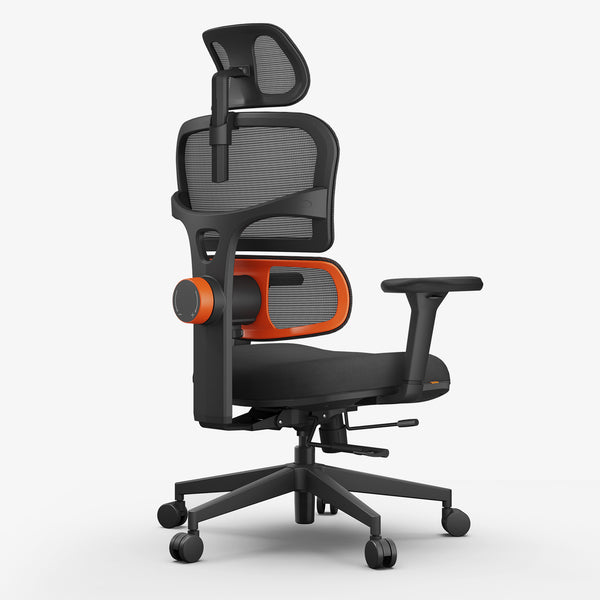
Newtral NT001: Adjustable Support for Focused Desk Work
The Newtral NT001 ergonomic office chair combines an adjustable seat depth, five-position backrest, 4D armrests, and lockable recline with auto-following lumbar support. Its high-density foam seat suits users who prefer cushioning with a breathable mesh back.
Best for: Home-office professionals, students, creators, and people who want broad adjustability for daily task work.
blog18
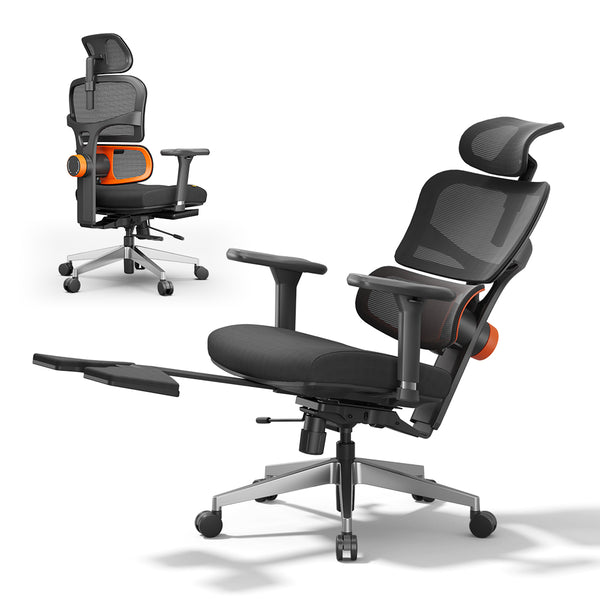
Newtral NT002: Task Support With a Built-In Footrest
The Newtral NT002 ergonomic home office chair adds an extendable footrest to a highly adjustable task-chair platform. It offers seat-depth adjustment, a five-position backrest, 4D armrests, an adjustable headrest, and recline from 96° to 136°.
blog18
Best for: Long mixed-use days that move between concentrated work, video calls, reading, and short reclined breaks.
You can also compare Newtral ergonomic chairs by features and use case.
Final Checklist Before You Buy
Before choosing an ergonomic task chair, confirm that:
- The seat-height range fits your legs and desk
- The seat depth leaves clearance behind your knees
- Lumbar support reaches the correct area of your back
- The armrests adjust low and close enough for relaxed shoulders
- Recline tension matches your body weight
- The chair supports both focused work and posture changes
- The base, casters, and weight capacity fit your environment
- The warranty and return period give you time to evaluate the fit
The right chair should not force your body into its shape. It should give you enough control to create a supportive setup, then continue supporting you as the workday changes.
Conclusion: Choose a Chair That Works With You
An ergonomic task chair is a working tool. Its value comes from fit, useful adjustment, and the freedom to move—not from a label or a long list of features.
Start with the fundamentals: supported feet, appropriate seat depth, correctly positioned lumbar support, relaxed shoulders, and easy access to the desk. Then consider how the chair responds when you lean, recline, and reset your posture.
When a task chair fits properly, you notice the work more and the chair less. Explore Newtral ergonomic chairs to find a model designed to follow the way your body moves.
FAQs About Ergonomic Task Chairs
What is the difference between a task chair and an ergonomic chair?
A task chair is designed for desk-based activities, while “ergonomic” describes how well a chair adjusts to the user and supports the work. A task chair can be basic or ergonomic. An ergonomic task chair combines a work-focused shape with adjustable seat height, seat depth, lumbar support, armrests, and recline.
Is an ergonomic task chair good for working from home?
Yes, provided its adjustment range fits both your body and your home workstation. It is especially useful when one chair must support typing, meetings, study, and occasional recline throughout the day.
Should an ergonomic task chair have a headrest?
A headrest is optional for active desk work but useful during recline, reading, and breaks. It should adjust to support the base of the head without pushing the head forward.
How much lumbar support should a task chair provide?
Lumbar support should comfortably meet the inward curve of your lower back. It should feel supportive without creating a hard pressure point. Height and tension adjustments help accommodate different spinal shapes and preferences.
How do I know whether the seat depth is correct?
Sit against the backrest with your feet supported. Aim for roughly two to three fingers of space between the front edge of the seat and the backs of your knees.
Is mesh or foam better for a task chair?
Mesh generally offers more airflow and a responsive feel. Foam provides a more cushioned surface. Quality, fit, and pressure distribution matter more than the material category alone.
Can an ergonomic task chair prevent back pain?
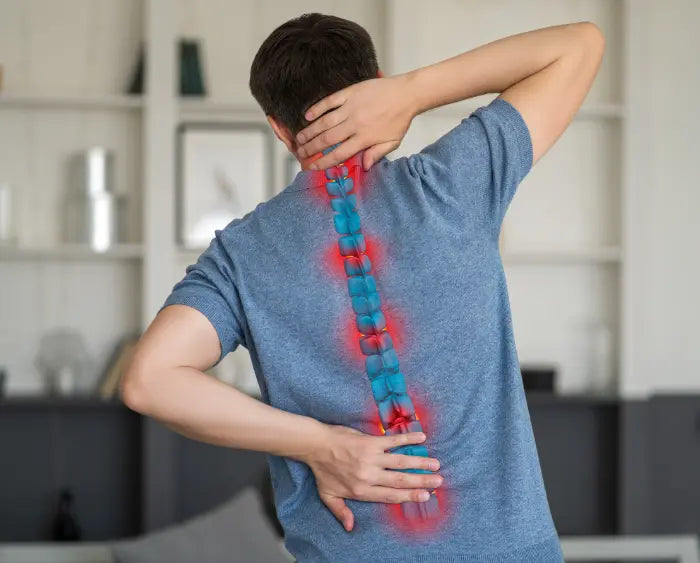
No chair can guarantee prevention or treatment of back pain. A properly fitted chair can support more neutral postures and reduce common sources of discomfort, but movement, workstation setup, work habits, and individual health conditions also matter. Persistent pain should be discussed with a qualified healthcare professional.
Editorial sources
- OSHA Computer Workstations eTool — Chairs: https://www.osha.gov/etools/computer-workstations/components/chairs
- East Carolina University — Computer Chair Adjustment: https://oehs.ecu.edu/workplace-safety/ergonomics/computer-chair-adjustment/
- Canadian Centre for Occupational Health and Safety — How to Adjust Office Chairs: https://www.ccohs.ca/oshanswers/ergonomics/office/chair_adjusting.html


Hinterlasse einen Kommentar
Alle Kommentare werden vor der Veröffentlichung geprüft.
Diese Website ist durch hCaptcha geschützt und es gelten die allgemeinen Geschäftsbedingungen und Datenschutzbestimmungen von hCaptcha.